How to Make Your Bangladesh Travel Map: Every District You've Visited in One Picture
"How much of Bangladesh have you seen?" answered in one picture. The steps to make your own Bangladesh travel map for free on your phone or computer, changing the theme, what to do if the download doesn't work, plus the world map, photo map and travel passport.

- Cost
- Completely free, no account needed
- Time
- 1–2 minutes
- Where
- unseenbangladesh.com, on phone or computer
- Steps
- Pick districts, choose a theme, download
- Also
- World map, photo map, travel passport
Trip ticket
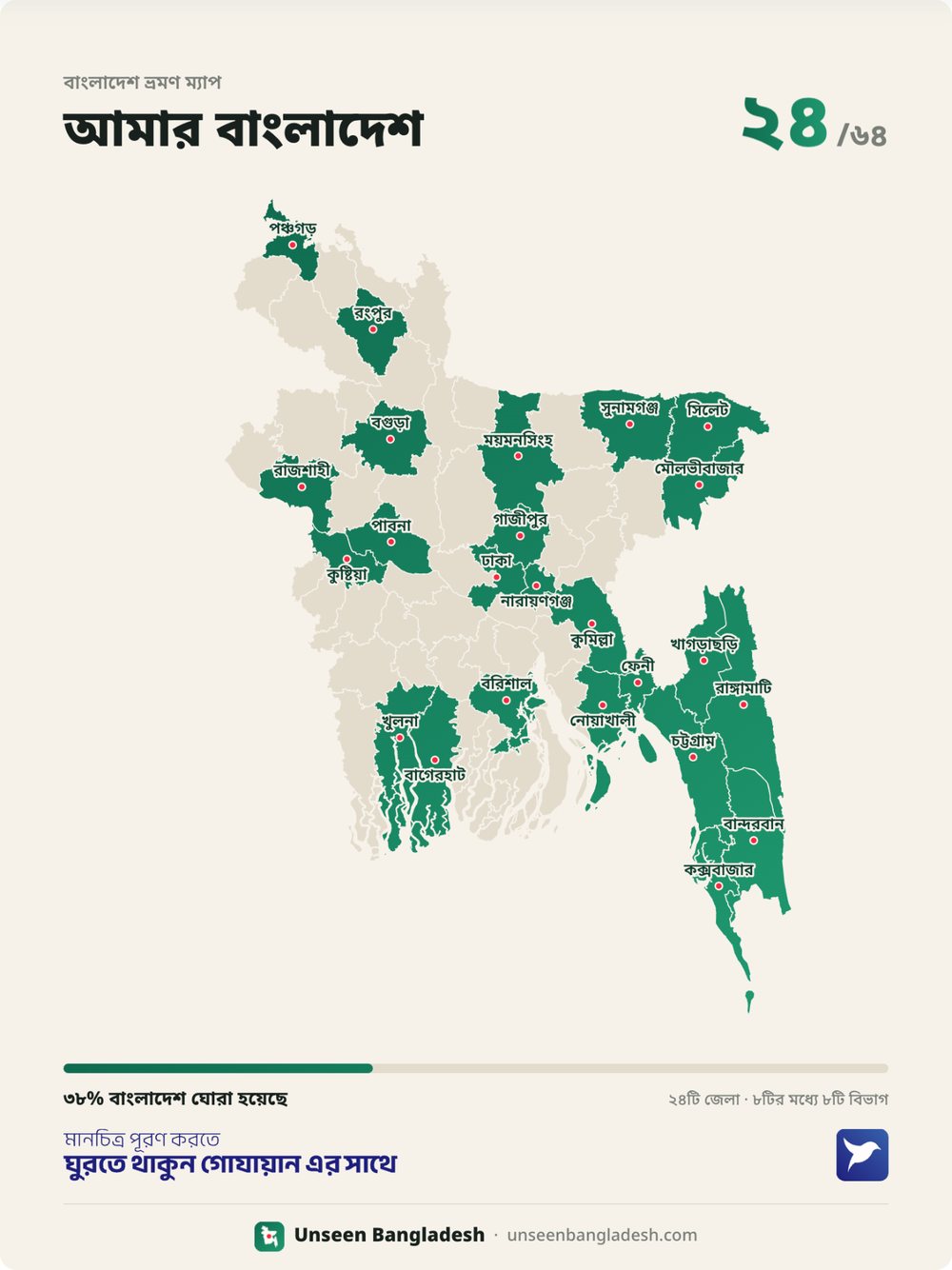
You've probably seen them on Facebook: a map of Bangladesh filled in green, "My Bangladesh" across the top and a big "24/64" in the corner. Some proudly show 50 districts visited; others admit they've never left their own division. And the comments all ask the same thing: "How do I make this?" The answer is simple, a minute or two's work and completely free. This post shows you step by step.
What the map is and why make one
It's a record of your travels around Bangladesh in a single picture. Districts you've been to are coloured in; the rest stay pale. The top shows how many of the 64 districts you've visited, and the bottom shows what percentage of Bangladesh that is and how many of the eight divisions you've set foot in.
- To keep track: see at a glance where you've been and where's left.
- To share with friends: a good-looking picture for Facebook, Instagram or WhatsApp.
- To pick your next trip: the empty districts suggest where to go next.
Making the map, step by step
Step 1: open the site
Open unseenbangladesh.com in your phone or computer browser. The map maker is right on the homepage. There's no app to install and no account to create.
Step 2: pick the districts you've visited
There are two ways to pick districts:
- From the list: tap district names in the "Districts I've visited" list. Type a name in Bangla or English in the search box above to find it quickly.
- On the map: tap any district on the map to select it; tap again to remove it.
The more districts you pick, the more colour fills the map and the higher the number at the top.
Step 3: choose a theme
Pick a theme to change the map's colours: green, dark blue, orange, light blue or black. You can also type your name, and the title changes from "My Bangladesh" to "[your name]'s Bangladesh". You can choose whether district names show on the map too.
Step 4: download
Tap "Download your map". The picture goes to your phone's gallery or your computer's downloads folder, ready to share.
If the download doesn't work
The most common problem is opening the site from a link in Facebook or Messenger. It then opens in Facebook's own small browser, where pictures often won't download.
- Tap the three dots (⋮ or …) in the top corner.
- Choose "Open in Chrome", "Open in browser" or "Open in Safari".
- Download again in Chrome or Safari. Your chosen districts, theme and name usually come across with you.
On an iPhone, if the picture doesn't go to your gallery, press and hold it and choose "Save to Photos" or "Add to Photos".
More maps you can make
- World travel map: pick the countries you've visited for your own world map, with the same themes and download.
- Photo map: a poster with your own photo inside each district, by district, by division or with neighbouring districts merged.
- Travel passport: passport-style stamps for the country's best-known places; collect a stamp for each place you visit. There's a separate passport for the world's countries too.
Sign in with Google to keep your map, saved places and game medals in one place, on any phone. And there's an Android app too: search "Unseen Bangladesh" on Google Play.
Ideas for filling in your map
Don't be disheartened by the empty districts: they're your list of next trips.
- See what each district has to offer on one page: famous places in all 64 districts.
- Give a few districts to the Trip Planner and it works out the order, what to see each day and roughly what it will cost.
- Going by train? Check times and fares on the train schedule page.
- Find little-known places shared by locals on the Hidden Gems page.
Questions and answers
How do I make a Bangladesh travel map?
Go to unseenbangladesh.com, pick the districts you've visited from the list or the map, choose a theme, then tap "Download your map".
Does it cost money or need an account?
No, it's completely free and works without an account. Signing in with Google just saves your map.
It won't download when I open it from Facebook. What should I do?
Facebook's and Messenger's built-in browsers often block downloads. Tap the three dots at the top, choose "Open in Chrome" or Safari, then download again.
How is the percentage on the map worked out?
It's the share of the 64 districts you've picked. For example, 24 districts is about 38%.
Can I make a map of the countries I've visited too?
Yes, on the world travel map page you pick countries the same way and make and download your own world map.
See it on the map, plan your trip
Look up the places, routes and costs, then put your own trip together.